class02
Basic JavaScript Instructions
Text
- Headings HTML has six “levels” of headings <h1> <h2> .. <h6>
Paragraphs
To create a paragraph, surround the words that make up the paragraph with an opening <p> tag and closing </p> tag
Bold & Italic: By enclosing words in the tags b and b we can make characters appear bold. i By enclosing words in the tags i and the i we can make characters appear italic.
Superscript & Subscrip
The * the sup* element is used to contain characters that should be superscript such as the suffixes of dates or mathematical concepts like raising a number to a power such as 22
The sub element is used to contain characters that should be subscript. It is commonly used with foot notes or chemical formulas such as H20. p On the 4th of September you will learn about E=MC2.</p><p>The amount of CO2 in the atmosphere grew by 2ppm in 20091.</p> On the 4th of September you will learn about E=MC2. The amount of CO2 in the atmosphere grew by 2ppm in 20091.
White Space: When the browser comes across two or more spaces next to each other, it only displays one space. Similarly if it comes across a line break, it treats that as a single space too. This is known as white space collapsing
Line Breaks & Horizontal Rules:
As you have already seen, the browser will automatically show each new paragraph or heading on a new line. But if you wanted to add a line break inside the middle of a paragraph you can use the line break tag
.
<hr /> To create a break between themes — such as a change of topic in a book or a new scene in a play — you can add a horizontal rule between sections using the <hr /> tag They also provide semantic information (e.g. where emphasis should be placed, the definition of any acronyms used, when given text is a quotation).
Abbreviations & Acronyms If abbr you use an abbreviation or an acronym, then the abbrelement can be used. A title attribute on the opening tag is used to specify the full term.
When you are referencing a piece of work such as a book, film or research paper, the cite element can be used to indicate where the citation is from
The dfn first time you explain some new terminology (perhaps an academic concept or some jargon) in a document, it is known as the defining instance of it
Author Details The address element has quite a specific use: to contain contact details for the author of the page Changes to Content
The ins element can be used to show content that has been inserted into a document, while the del element can show text that has been deleted from it.
The s element indicates something that is no longer accurate or relevant (but that should not be deleted)
Introducing CSS
The key to understanding how CSS works is to imagine that there is an invisible box around every HTML element.
-
CSS Associates Style rules with HTML elements CSS works by associating rules with HTML elements. These rules govern how the content of specified elements should be displayed. A CSS rule contains two parts: a selector and a declaration
-
CSS Properties Affect How Elements Are Displayed CSS declarations sit inside curly brackets and each is made up of two parts: a property and a value, separated by a colon. You can specify several properties in one declaration, each separated by a semi-colon.
-
Using External CSS The element can be used in an HTML document to tell the browser where to find the CSS file used to style the page. It is an empty element (meaning it does not need a closing tag), and it lives inside the <head> element. It should use three attributes:
- href This specifies the path to the CSS file (which is often placed in a folder called css or styles)
- Type: This attribute specifies the type of document being linked to. The value should be text/css.
- rel This specifies the relationship between the HTML page and the file it is linked to. The value should be stylesheet when linking to a CSS file.
Using Internal CSS

CSS Selectors: Different types of selectors allow you to target your rules at different elements.

- CSS rules usually appear in a separate document, although they may appear within an HTML page.
Inheritance

Basic javascript instructions
- When you want to use JavaScript with a web page, you use the HTML **The HTML *
- A script is a series of instructions that a computer can follow one-by-one. Each individual instruction or step is known as a statement. Statements should end with a semicolon.
- JAVASCRIPT IS CASE SENSITIVE
- You should write comments to explain what your code does. They help make your code easier to read and understand. This can help you and others who read your code
- MULTI-LINE COMM ENTS
- SINGLE-LINE COMMENTS
A script will have to temporarily store the bits of information it needs to do its job. It can store this data in variables.
JavaScript DATA TYPES distinguishes between numbers, strings, and true or false values known as Booleans.
Here are six rules you must always follow when giving a variable a name:
- The name must begin with a letter, dollar sign ($),or an underscore (_). It must not start with a number.
- All variables are case sensitive, so score and Score would be different variable names, but it is bad practice to create two variables that have the same name using different cases.
- The name can contain letters, numbers, dollar sign ($), or an underscore (_). Note that you must not use a dash(-) or a period (.) in a variable name.
- Use a name that describes the kind of information that the variable stores. For example, fi rstName might be used to store a person’s first name, l astNarne for their last name, and age for their age.
- You cannot use keywords or reserved words. Keywords are special words that tell the interpreter to do something. For example, var is a keyword used to declare a variable. Reserved words are ones that may be used in a future version of JavaScript. ONLINE EXTRA View a full list of keywords and reserved words in JavaScript.
- If your variable name is made up of more than one word, use a capital letter for the first letter of every word after the first word. For example, f i rstName rather than fi rstnarne (this is referred to as camel case). You can also use an underscore between each word (you cannot use a dash).
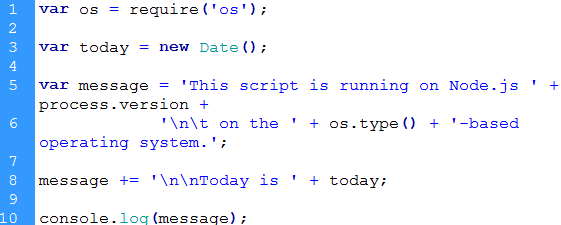
example of JS code
Arrays
- Arrays are special types of variables that store more than one piece of related information.
- JavaScript distinguishes between numbers (0-9), strings (text), and Boolean values (true or false).
- Expressions evaluate into a single value.
- Expressions rely on operators to calculate a value.
ARITHMETI C OPERATORS JavaScript contains the following mathematical operators, which you can use with numbers. You may remember some from math class.
- STRING OPERATOR There is just one string operator: the+ symbol. It is used to join the strings on either side of it.

Decisions & loops
1- Comparison and Logical operators
You can evaluate a situation by comparing one value in the script to what you expect it might be. The result wil be a boolean: true or false.
-
> greater than: Returns true if the left operand is greater than the right operand.
-
>= greater than or equal to:Returns true if the left operand is greater than or equal to the right operand.
-
< less than:Returns true if the left operand is less than the right operand.
-
*<= less than or equal to:Returns true if the left operand is less than or equal to the right operand. *
Keep in mind that you must use “==”, not “=”, when testing if two primitive values are equal.
- equal to (==) :Returns true if the operands are equal.
- not equal to (!=) : Returns true if the operands are not equal.
- Strict equal (===) :Returns true if the operands are equal and of the same type.
- Strict not equal (!==) :Returns true if the operands are of the same type but not equal, or are of different type.
- Logical operators
Logical operators allow you to compare the results of more than one comparison operator.
- Logical AND (&&)
- expr1 && expr2
- Returns expr1 if it can be converted to false; otherwise, returns expr2. Thus, when used with Boolean values, && returns true if both operands are true; otherwise, returns false.
-
Logical OR ( ) -
expr1 expr2 -
Returns expr1 if it can be converted to true; otherwise, returns expr2. Thus, when used with Boolean values, returns true if either operand is true; if both are false, returns false.
-
- Logical NOT (!)
- !expr
- Returns false if its single operand that can be converted to true; otherwise, returns true.
The following code shows examples of the && (logical AND) operator:
var a1 = true && true; // t && t returns true var a2 = true && false; // t && f returns false var a3 = false && true; // f && t returns false var a4 = false && (3 == 4); // f && f returns false var a5 = ‘Cat’ && ‘Dog’; // t && t returns Dog var a6 = false && ‘Cat’; // f && t returns false var a7 = ‘Cat’ && false; // t && f returns false
2- LOOPS
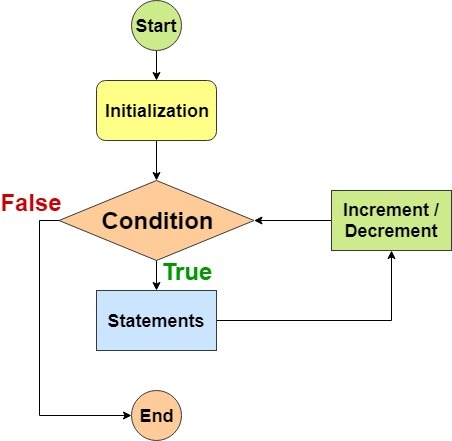
Loops are used in JavaScript to perform repeated tasks based on a condition. Conditions typically return true or false when analysed. A loop will continue running until the defined condition returns false.
The three most common types of loops are:
1- For
If you need to run code a speciific number of times , use a for loop.in a for loop , the condition is usually a counter which is used to tell how many times the loop should run INITIALIZATION , CONDITION, UPDATE
2- while
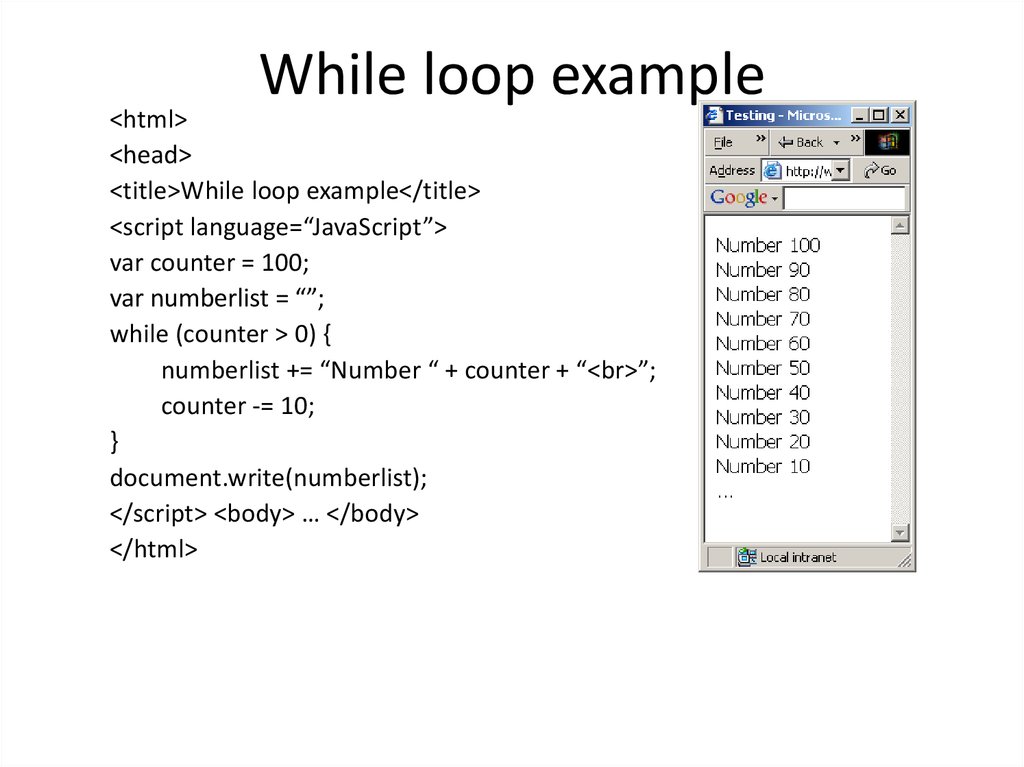
If you do not know how many times the code should run , you can use a while loop. Here the condition can be something other than counter, and the code will continue to loop foras long as the condition is true
using while loops
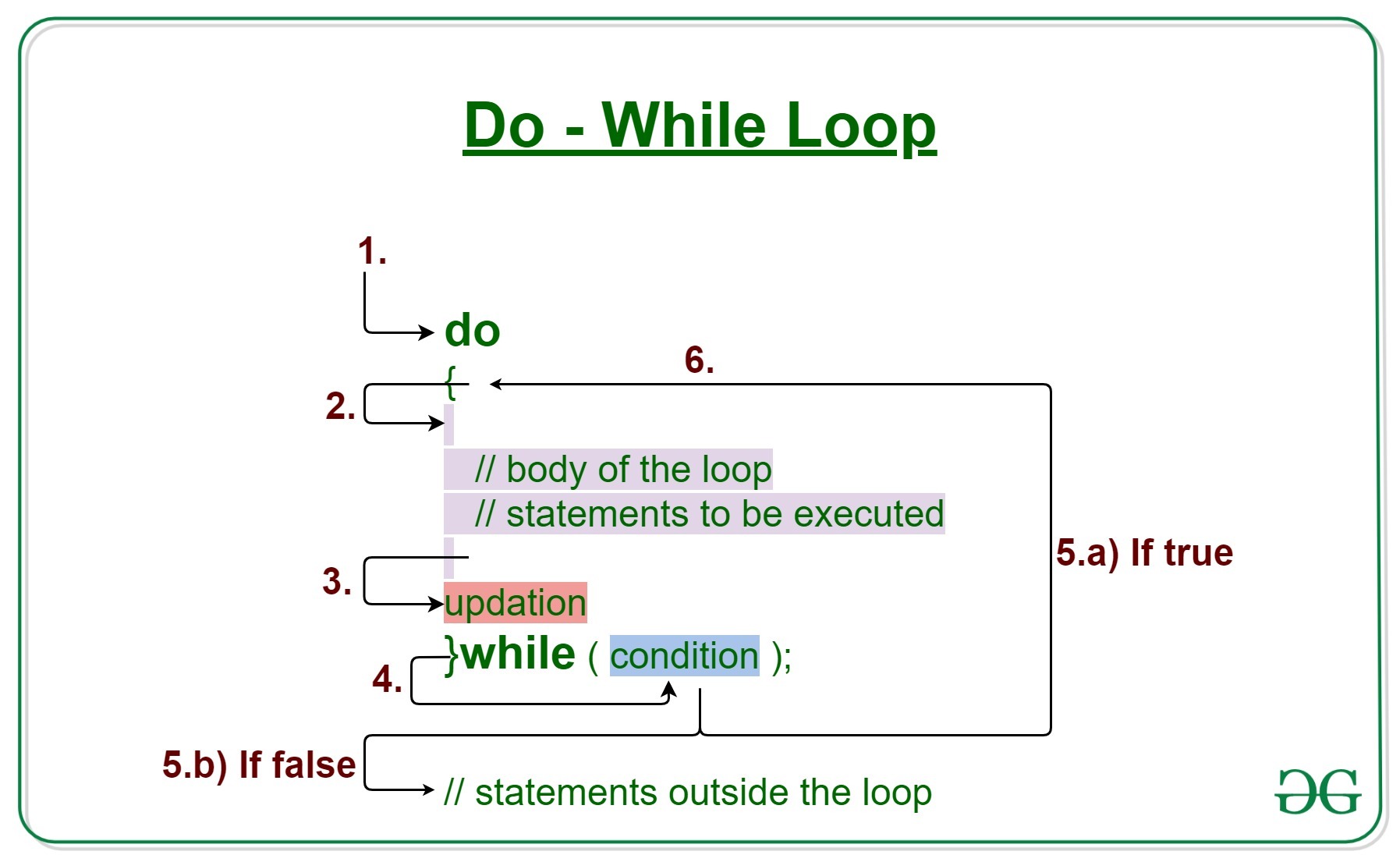
3- do while
The do…while loop is very similar to the while loop, but hasone key difference: itwill always run the statements inside the curly braces at least once, even if the condition evaluates to false.
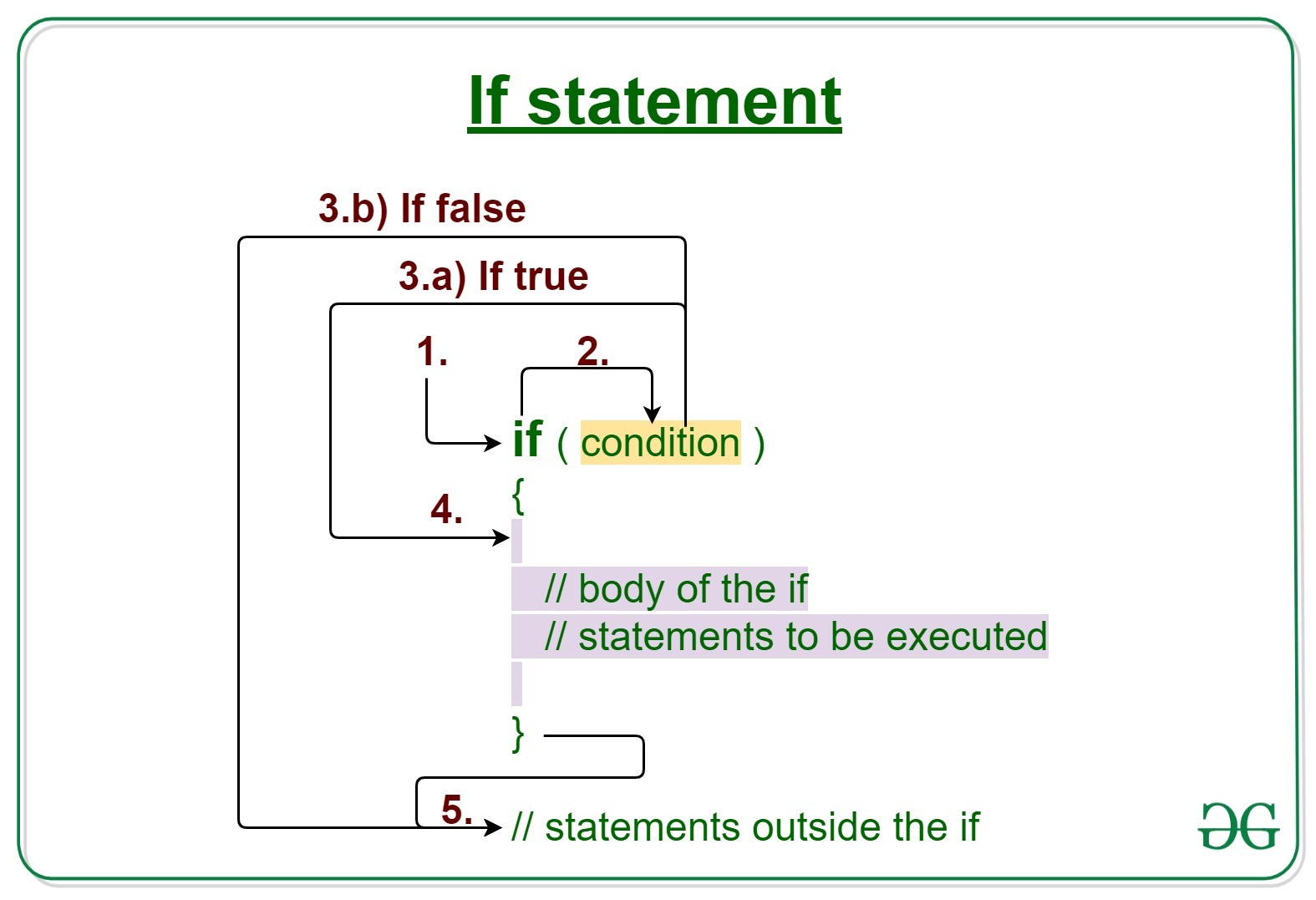
If statements: