When you visit a website, the web server hosting that site could be anywhere in the world. In order for you to find the location of the web server, your browser will first connect to a Domain Name System (DNS) server
Structure
HTML Uses Elements to Describe the Structure of Pages
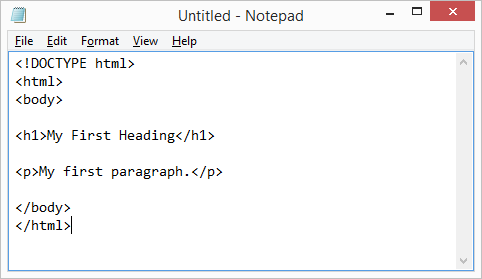
Let’s look closer at the code from the last page.
There are several different elements. Each
element has an opening tag and a closing tag.
Tags act like containers. They tell you something about the information that lies between their opening and closing tags
Tags usually come in pairs. The opening tag denotes
the start of a piece of content; the closing tag denotes
the end.
Attributes Tell Us More About Elements
Opening tags can carry attributes, which tell us more
about the content of that element.
Attributes require a name and a value.
Extra Markup
Because there have been several versions of HTML, each
web page should begin with a DOCTYPE declaration to tell a
browser which version of HTML the page is using (although
browsers usually display the page even if it is not included).
Comments in HTML:
ID Attribute:Every HTML element can carry the id attribute. It is used to uniquely identify that element
from other elements on the page. Its value should start with a letter or an underscore (not a number or any other character).
Class Attribute:Every HTML element can also carry a class attribute. Sometimes, rather than uniquely identifying one element within a document, you will want a way to identify several elements as being different from the other elements on the page.
Block Elements:Some elements will always appear to start on a new line in the browser window. These are known as block level elements.
Inline Elements: Some elements will always appear to continue on the same line as their neighbouring elements. These are known as inline elements.
The <div> and elements allow you to group
block-level and inline elements together.
cut windows into your web pages through
which other pages can be displayed.
The tag allows you to supply all kinds of
information about your web page.
Escape CharactersThere are some characters that are used in
and reserved by HTML code. (For example, the
left and right angled brackets.)
HTML5 Layout
HTML5 introduces a new set of elements that allow you to divide up the parts of a page. The names of these elements indicate the kind of content you will find in them. They are still subject to change, but that has not stopped many web page authors using them already.
Headers & Footers <header> <footer>:The <header> and <footer> elements can be used for:
The main header or footer that appears at the top or bottom of every page on the site.
A header or footer for an individual <article> or <section> within the page.
Navigation <nav>:The <nav> element is used to contain the major navigational blocks on the site such as the primary site navigation
Articles <article> :The <article> element acts as a container for any section of a page that could stand alone and potentially be syndicated.
Article:The <aside> element has two purposes, depending on whether it is inside an <article> element or not.
Sections:The <section> element groups related content together, and typically each section would have its own heading.
The <section> element groups related content together, and typically each section would have its own heading.
Figures:You already met the ** element in Chapter 5 when we looked at images. It can be used to contain any content that is referenced from the main flow of an article (not just images).
To make HTML5 elements work in Internet Explorer 8
(and older versions of IE), extra JavaScript is needed,
which is available free from Google.
Process & Design
Who is the Site For?
Every website should be designed for the target audience—not just for yourself or the site owner. It is therefore very important to understand who your target audience is.
Why People Visit YOUR Website
To help determine why people are coming to your website,
there are two basic categories of questions you can ask:
The first attempts to discover the underlying motivations for why visitors come to the site.
The second examines the specific goals of the visitors. These are the triggers making them come to the site now
What Your Visitors are Trying to Achieve: It is unlikely that you will be able to list every reason why someone visits your site but you are looking for key tasks and motivations.
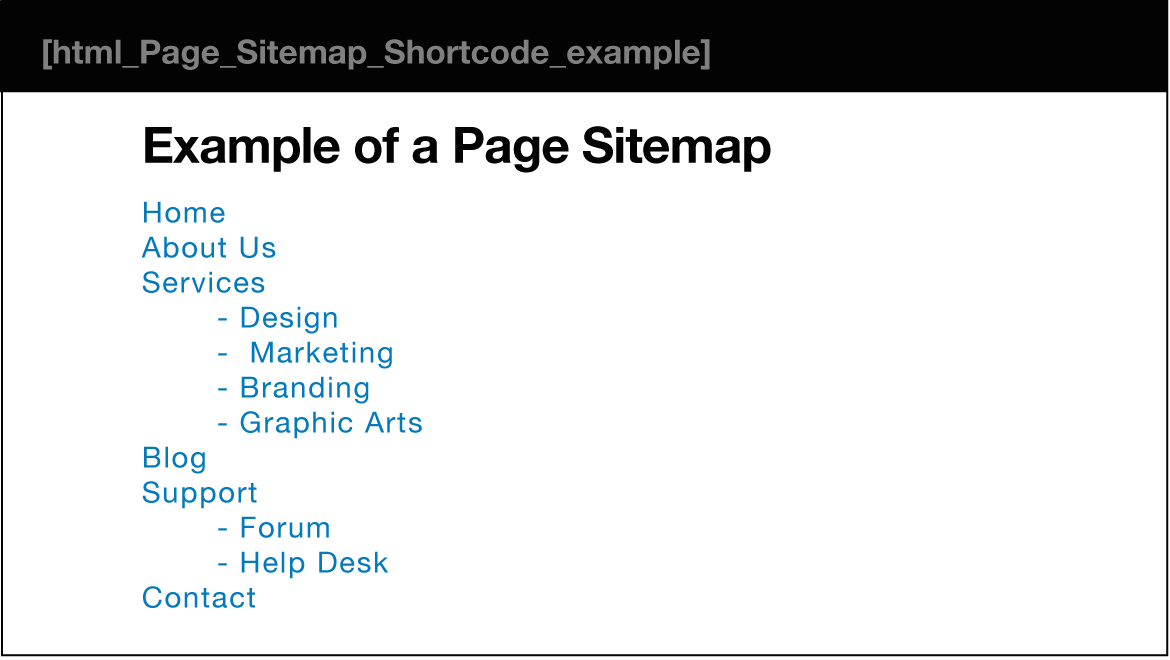
Site maps allow you to plan the structure of a site.
Wireframes allow you to organize the information that will need to go on each page.
Design is about communication. Visual hierarchy helps visitors understand what you are trying to tell them.
Visual hierarchy
Most web users do not read entire pages. Rather, they skim to find information. You can use contrast to create a visual hierarchy that gets across your key message and helps users find what they are looking for.
You can differentiate between pieces of information
using size, color, and style.
You can use grouping and similarity to help simplify
the information you present.
introduction for JS:
BEHAVIOR LAYER .js files This is where we can change how the page behaves, adding interactivity. We will aim to keep as much of our JavaScript as possible in separate files.
Create a folder to put the example in called cOl, then start up your favorite code editor, and enter the text to the right. A JavaScript file is just a text file (like HTML and CSS files are) but it has a . j s file extension, so save this file with the name add-content . j s
The ABC of Programming
A script
When you want to use JavaScript with a web page, you use the HTML
**The HTML
A script is a series of instructions that a computer can follow one-by-one. Each individual instruction or step is known as a statement. Statements should end with a semicolon.
COMPUTERS CREATE MODELS OF THE WORLD USING DATA
OBJECTS & PROPERTIES
**In computer programming, each physical thing in the world can be represented as an object.
Each object can have its own: **
Properties
Events:In the real world, people interact with objects. These interactions can change the values of the properties in these objects.
Methods: Methods represent things people need to do with objects. They can retrieve or update the values of an object’s properties.
**Together they create a working model of that object.PUTTING IT ALL TOGETHER Computers use data to create models of things in the real world. The events, methods, and properties of an object all relate to each other: Events can trigger methods, and methods can retrieve or update an objects properties. **
THE DOCUMENT OBJECT REPRESENTS AN HTML PAGE Using the document object, you can access and change what content users see on the page and respond to how they interact with it.
HOW A BROWSER SEES A WEB PAGE?
RECEIVE A PAGE AS HTML CODE
CREATE A MODEL OF THE PAGE AND STORE IT IN MEMORY.
USE A RENDERING ENGINE TO SHOW THE PAGE ON SCREEN.
How do i write a script for a web page?
It is best to keep JavaScript code in its own JavaScript file. JavaScript files are text files (like HTML pages and CSS style sheets), but they have the . j s extension.
The HTML
If you view the source code of the page in the browser, the JavaScript will not have changed the HTML, because the script works with the model of the web page that the browser has created.