Authentication
1-What is OAuth?
OAuth is an open-standard authorization protocol or framework that describes how unrelated servers and services can safely allow authenticated access to their assets without actually sharing the initial, related, single logon credential. In authentication parlance, this is known as secure, third-party, user-agent, delegated authorization.
allows websites and services to share assets among users. It is widely accepted, but be aware of its vulnerabilities.
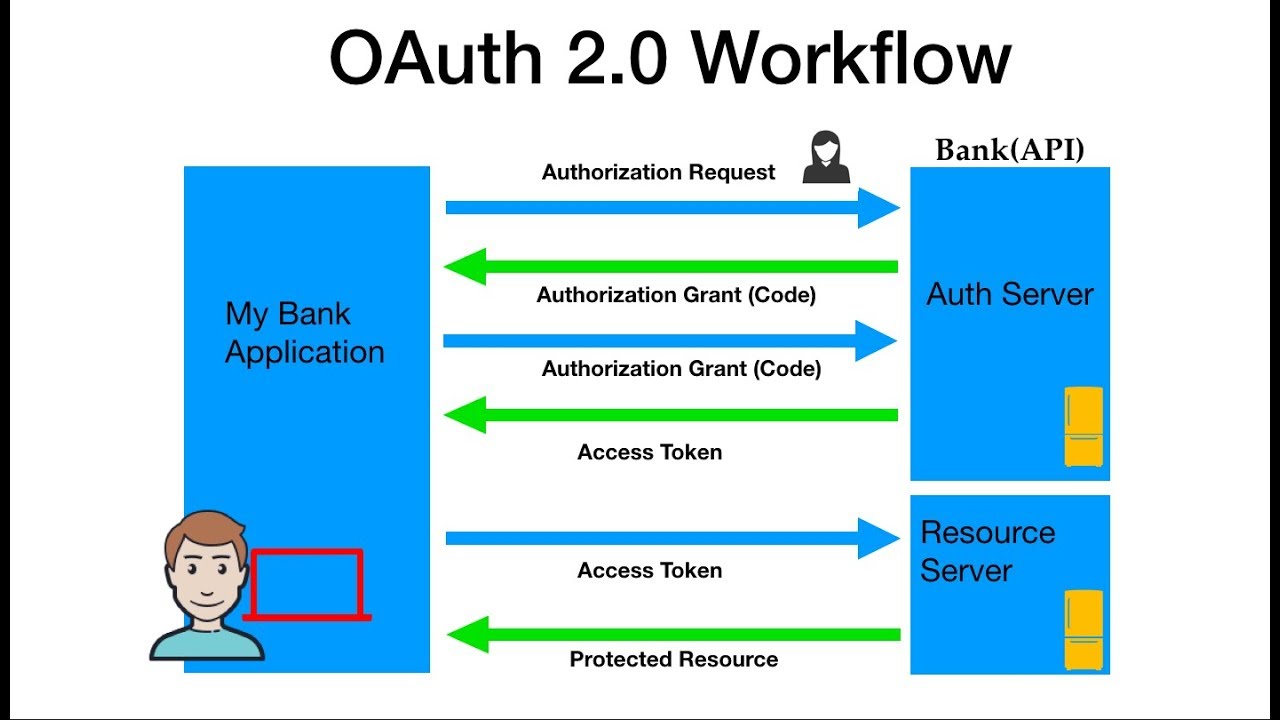
2-Give an example of what using OAuth would look like?
The simplest example of OAuth is when you go to log onto a website and it offers one or more opportunities to log on using another website’s/service’s logon. You then click on the button linked to the other website, the other website authenticates you, and the website you were originally connecting to logs you on itself afterward using permission gained from the second website.
3-How does OAuth work? What are the steps that it takes to authenticate the user?

Let’s assume a user has already signed into one website or service (OAuth only works using HTTPS). The user then initiates a feature/transaction that needs to access another unrelated site or service. The following happens (greatly simplified):
-
The first website connects to the second website on behalf of the user, using OAuth, providing the user’s verified identity.
-
The second site generates a one-time token and a one-time secret unique to the transaction and parties involved.
-
The first site gives this token and secret to the initiating user’s client software.
-
The client’s software presents the request token and secret to their authorization provider (which may or may not be the second site).
-
If not already authenticated to the authorization provider, the client may be asked to authenticate. After authentication, the client is asked to approve the authorization transaction to the second website.
-
The user approves (or their software silently approves) a particular transaction type at the first website.
-
The user is given an approved access token (notice it’s no longer a request token).
-
The user gives the approved access token to the first website.
-
The first website gives the access token to the second website as proof of authentication on behalf of the user.
-
The second website lets the first website access their site on behalf of the user.
-
The user sees a successfully completed transaction occurring.
-
OAuth is not the first authentication/authorization system to work this way on behalf of the end-user. In fact, many authentication systems, notably Kerberos, work similarly. What is special about OAuth is its ability to work across the web and its wide adoption. It succeeded with adoption rates where previous attempts failed (for various reasons).
4-What is OpenID?
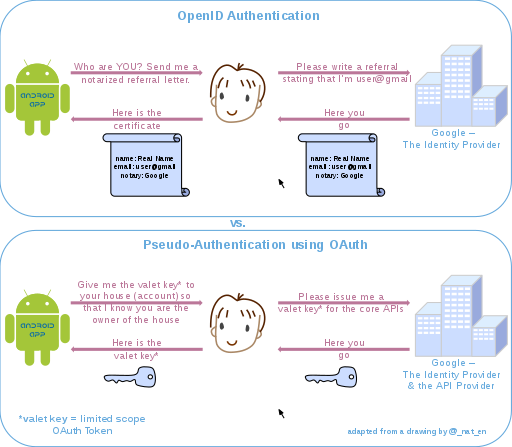
is for humans logging into machines, OAuth is for machines logging into machines on behalf of humans.
Connect is an interoperable authentication protocol based on the OAuth 2.0 family of specifications. … OpenID Connect allows for clients of all types, including browser-based JavaScript and native mobile apps, to launch sign-in flows and receive verifiable assertions about the identity of signed-in users
Authorization and Authentication flows
1-What is the difference between authorization and authentication?
uthentication and authorization might sound similar, but they are distinct security processes in the world of identity and access management (IAM). Authentication confirms that users are who they say they are. Authorization gives those users permission to access .
Auth0 uses the OpenID Connect (OIDC) Protocol and OAuth 2.0 Authorization Framework to authenticate users and get their authorization to access protected resources. With Auth0, you can easily support different flows in your own applications and APIs without worrying about OIDC/OAuth 2.0 specifications or other technical aspects of authentication and authorization.
2.What is Authorization Code Flow?
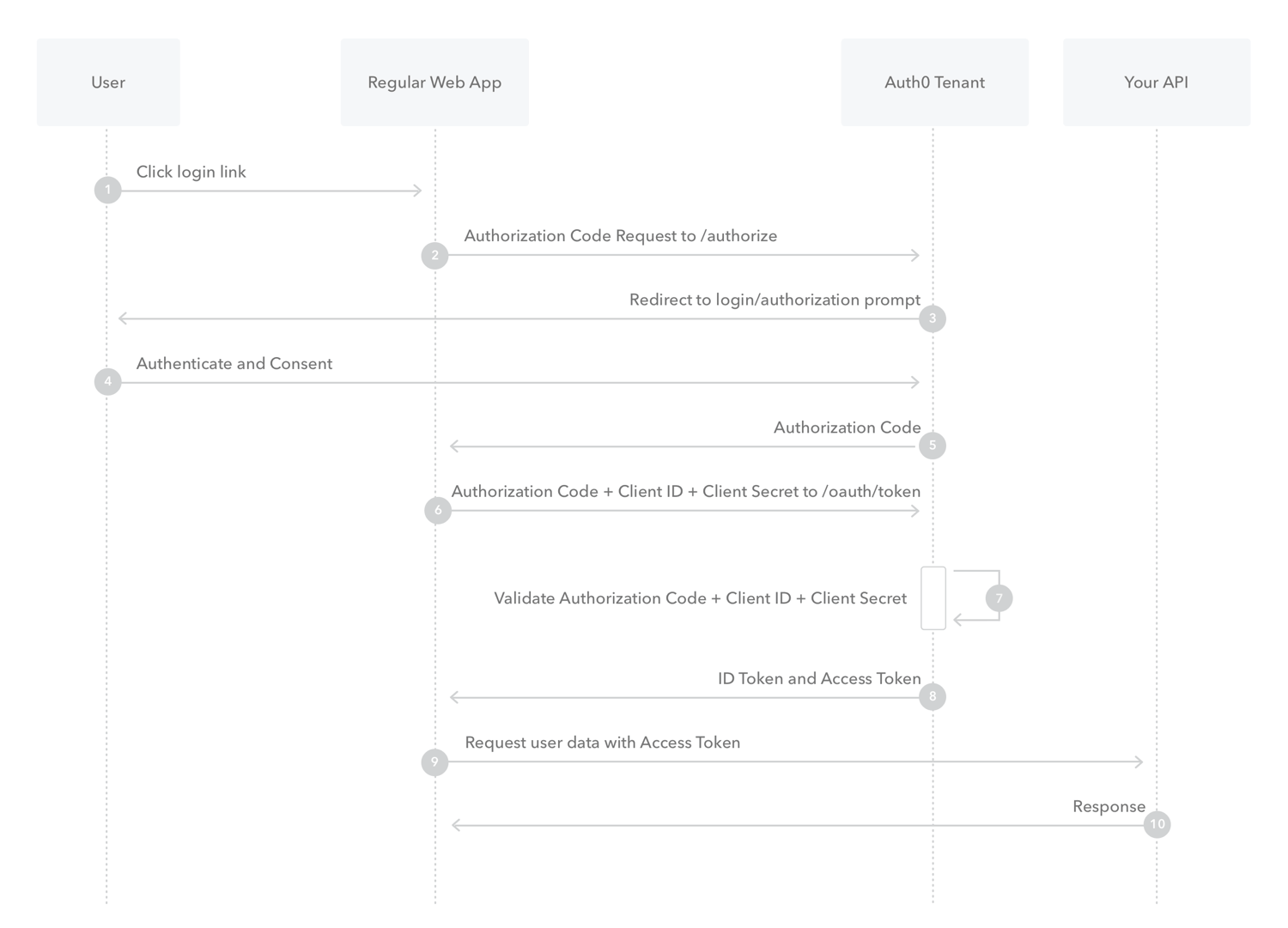
Because regular web apps are server-side apps where the source code is not publicly exposed, they can use the Authorization Code Flow, which exchanges an Authorization Code for a token. Your app must be server-side because during this exchange, you must also pass along your application’s Client Secret, which must always be kept secure, and you will have to store it in your client.
-
The user clicks Login within the regular web application.
-
Auth0’s SDK redirects the user to the Auth0 Authorization Server (/authorize endpoint).
-
Your Auth0 Authorization Server redirects the user to the login and authorization prompt.
-
The user authenticates using one of the configured login options and may see a consent page listing the permissions Auth0 will give to the regular web application.
-
Your Auth0 Authorization Server redirects the user back to the application with an authorization code, which is good for one use.
-
Auth0’s SDK sends this code to the Auth0 Authorization Server (/oauth/token endpoint) along with the application’s Client ID and Client Secret.
-
Your Auth0 Authorization Server verifies the code, Client ID, and Client Secret.
-
Your Auth0 Authorization Server responds with an ID Token and Access Token (and optionally, a Refresh Token).
*Your application can use the Access Token to call an API to access information about the user.
- The API responds with requested data.
3-What is Authorization Code Flow with Proof Key for Code Exchange (PKCE)?
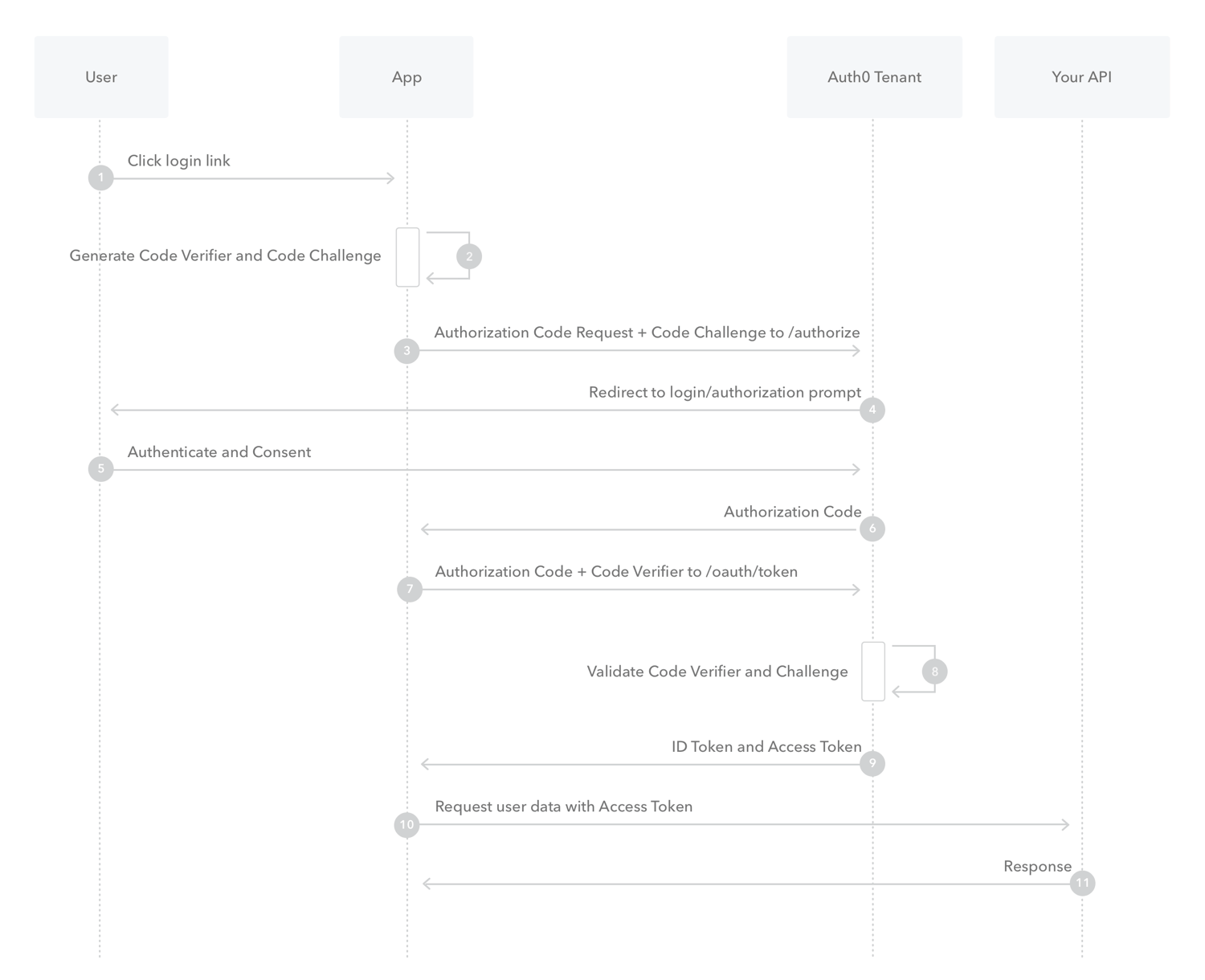
The PKCE-enhanced Authorization Code Flow introduces a secret created by the calling application that can be verified by the authorization server; this secret is called the Code Verifier. Additionally, the calling app creates a transform value of the Code Verifier called the Code Challenge and sends this value over HTTPS to retrieve an Authorization Code. This way, a malicious attacker can only intercept the Authorization Code, and they cannot exchange it for a token without the Code Verifier.
-
The user clicks Login within the application.
-
Auth0’s SDK creates a cryptographically-random code_verifier and from this generates a code_challenge.
-
Auth0’s SDK redirects the user to the Auth0 Authorization Server (/authorize endpoint) along with the code_challenge.
-
Your Auth0 Authorization Server redirects the user to the login and authorization prompt.
-
The user authenticates using one of the configured login options and may see a consent page listing the permissions Auth0 will give to the application.
-
Your Auth0 Authorization Server stores the code_challenge and redirects the user back to the application with an authorization code, which is good for one use.
-
Auth0’s SDK sends this code and the code_verifier (created in step 2) to the Auth0 Authorization Server (/oauth/token endpoint).
-
Your Auth0 Authorization Server verifies the code_challenge and code_verifier.
-
Your Auth0 Authorization Server responds with an ID Token and Access Token (and optionally, a Refresh Token).
-
Your application can use the Access Token to call an API to access information about the user.
-
The API responds with requested data.
4-What is Implicit Flow with Form Post?

Implicit Flow with Form Post flow uses OIDC to implement web sign-in that is very similar to the way SAML and WS-Federation operates. The web app requests and obtains tokens through the front channel, without the need for secrets or extra backend calls. With this method, you don’t need to obtain, maintain, use, and protect a secret in your application.
-
The user clicks Login in the app.
-
Auth0’s SDK redirects the user to the Auth0 Authorization Server (/authorize endpoint) passing along a response_type parameter of id_token that indicates the type of requested credential. It also passes along a response_mode parameter of form_post to ensure security.
-
Your Auth0 Authorization Server redirects the user to the login and authorization prompt.
-
The user authenticates using one of the configured login options and may see a consent page listing the permissions Auth0 will give to the app.
-
Your Auth0 Authorization Server redirects the user back to the app with an ID Token.
5-What is Client Credentials Flow?
With machine-to-machine (M2M) applications, such as CLIs, daemons, or services running on your back-end, the system authenticates and authorizes the app rather than a user. For this scenario, typical authentication schemes like username + password or social logins don’t make sense. Instead, M2M apps use the Client Credentials Flow, in which they pass along their Client ID and Client Secret to authenticate themselves and get a token.

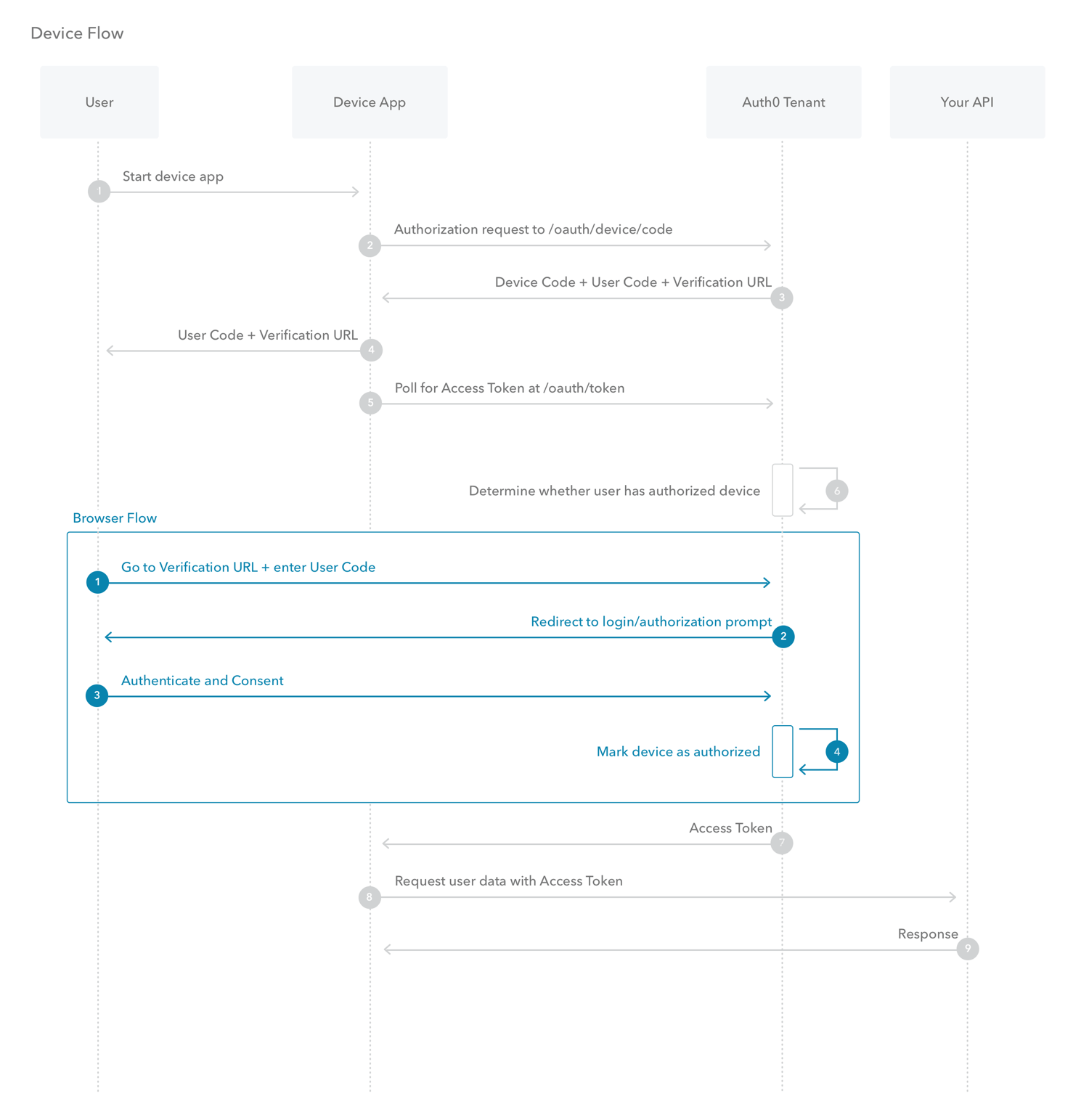
6-What is Device Authorization Flow?
With input-constrained devices that connect to the internet, rather than authenticate the user directly, the device asks the user to go to a link on their computer or smartphone and authorize the device. This avoids a poor user experience for devices that do not have an easy way to enter text. To do this, device apps use the Device Authorization Flow , in which they pass along their Client ID to initiate the authorization process and get a token.
7-What is Resource Owner Password Flow?
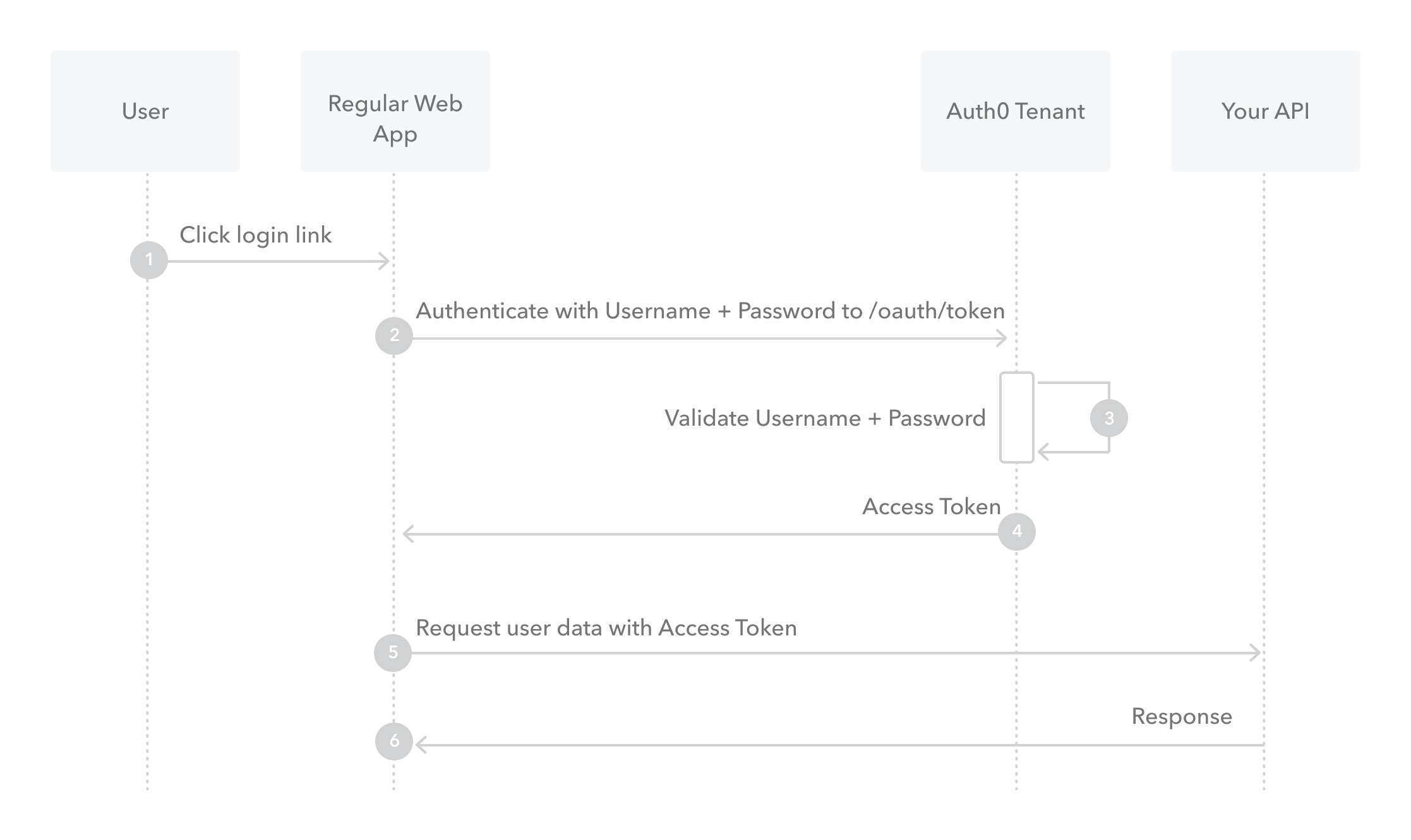
Though we do not recommend it, highly-trusted applications can use the Resource Owner Password Flow 2.0 RFC 6749, , which requests that users provide credentials (username and password), typically using an interactive form. Because credentials are sent to the backend and can be stored for future use before being exchanged for an Access Token, it is imperative that the application is absolutely trusted with this information.
Even if this condition is met, the Resource Owner Password Flow should only be used when redirect-based flows (like the Authorization Code Flow) cannot be used.
-
The user clicks Login within the application and enters their credentials.
-
Your application forwards the user’s credentials to your Auth0 Authorization Server (/oauth/token endpoint).
-
Your Auth0 Authorization Server validates the credentials.
-
Your Auth0 Authorization Server responds with an Access Token (and optionally, a Refresh Token).
-
Your application can use the Access Token to call an API to access information about the user.
-
The API responds with requested data.